
REVIEW · MARYLAND
Self-guided Waterfall Hiking Tour through Great Falls National Park
Book on Viator →Operated by Doug Z · Bookable on Viator
Three viewpoints. One rugged river roar.
This self-guided Great Falls hike is interesting because the GPS-triggered audio keeps you moving without a guide, and the step-by-step directions make the park feel doable even if it’s your first time here. I also like that it’s built for independent exploration, so you can linger where you want. One catch: since cell service can be spotty in the park, you need to download the VoiceMap app and the Great Falls tour before you enter, or you may lose your audio timing.
What makes this work well is the simple setup in the car-to-trail rhythm. I’d plan to start at the Great Falls Visitor Center, plug in headphones, and let the route guide you from stop to stop. Also remember the $20 vehicle access pass (and parking) are not included, so the real cost is the tour plus what the park charges to get you into the grounds.
In This Review
- Key Points to Know Before You Go
- Great Falls in 2–3 Hours: What the GPS Audio Really Does
- Start at the Great Falls Visitor Center: VoiceMap Setup That Prevents Headaches
- Stop 1: Great Falls Park—Three-View Waterfall Power, Plus a Guided Feel
- Matildaville Trail: A Forgotten Community on a Short, Moving Detour
- Stop 3: Great Falls Overlooks—Billy Goat Trail Cliffs and Gorge Views
- What to Bring and How Hard It Is (Phone, Headphones, and Stroller Reality)
- Price and Value: The Tour Fee vs. the Real Cost of Getting In
- Who Should Book This Self-Guided Waterfall Hike?
- Should You Book This Voice-Guided Hike? My Decision Guide
- FAQ
- Is this tour guided by a live person?
- How long does the Great Falls self-guided hike take?
- Where does the tour start?
- Do I need the $20 vehicle access pass to enter the park?
- Does the tour work without cell phone service?
- Is it stroller friendly?
Key Points to Know Before You Go

- GPS-triggered, hands-free listening: the audio is designed to start as you reach each part of the route.
- Download-first matters: weak reception in the park can break the experience if you don’t prep ahead of time.
- Three major waterfall moments: you get multiple overlooks, plus context for what you’re seeing downstream and on cliff routes.
- Matildaville Trail adds story: the ruins of an abandoned riverside community turn the hike into more than scenery.
- Not stroller friendly: plan on a carried baby or compact gear if you’re traveling with a small child.
- Small group by design: the activity caps at 20 people, which helps keep the starting area from feeling chaotic.
Great Falls in 2–3 Hours: What the GPS Audio Really Does

Great Falls National Park is one of those rare places where you can see big scenery fast. The self-guided format turns that advantage into something practical: you’re not trying to read maps while standing in wind and mist. Instead, you follow a walking route with audio cues that trigger with GPS, and you get narration aimed at both the big-name waterfalls and the less obvious angles.
The route is built to keep you in motion, which is a big deal when you only have a short time. If you’re visiting Washington, DC, you may not want a whole day just to drive and park and then figure out where to go next. This tour is paced for that reality: roughly 2 to 3 hours, depending on how long you stop at overlooks and how often you check your phone.
You should also know what self-guided does and doesn’t mean. There’s no live guide, so the app is your “host.” That’s great when you like control, but it means you’ll want to read the setup notes carefully and keep your phone charged.
Start at the Great Falls Visitor Center: VoiceMap Setup That Prevents Headaches
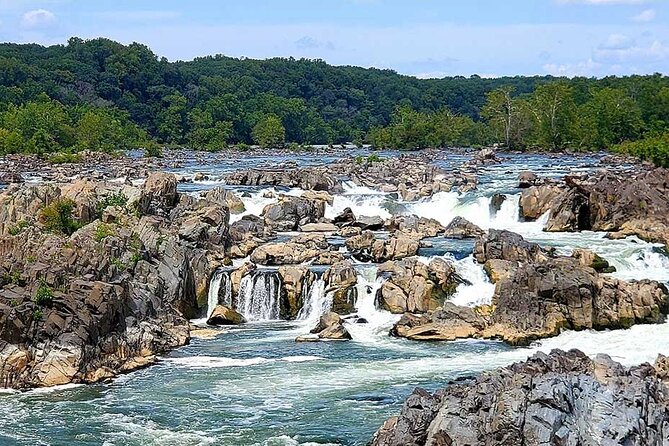
Your starting point is the Great Falls Visitor Center, 9200 Old Dominion Dr, McLean, VA 22102. The audio tour is designed to begin there, so give yourself enough time to park, walk inside or near the area, and get your setup right before you start.
Here’s the part that decides whether this feels smooth or stressful: download the VoiceMap app and the Great Falls tour before you step into the park grounds. Cell phone service can be less than ideal once you’re in. If you don’t prep, you can end up staring at a spinning download icon while you’re supposed to be listening.
When you’re ready, enable GPS/location on your phone and keep headphones handy. The tour is described as GPS-triggered and hands-free, which is exactly what you want on a trail: you shouldn’t need to keep tapping your screen every few minutes. In my experience with GPS audio formats, that small “set it and forget it” feeling is what makes it worth doing.
One more detail that can save time: you’ll receive a tour code to enter into the app so you can access the correct route. If you’re the kind of person who likes everything staged, open the app early and make sure the code is ready before you begin walking.
Stop 1: Great Falls Park—Three-View Waterfall Power, Plus a Guided Feel
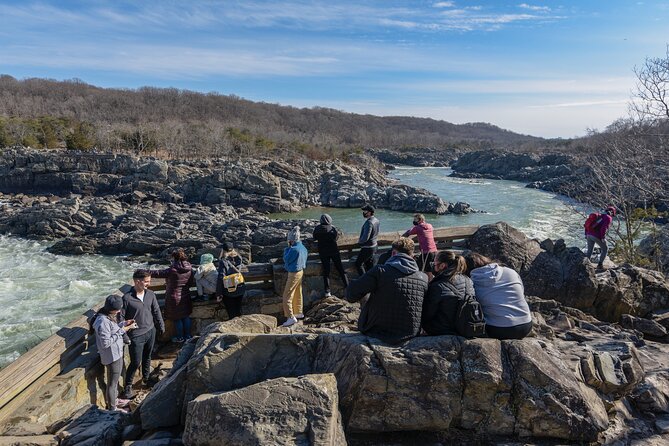
Stop 1 is where the park earns its reputation. Great Falls is described as the 3rd largest waterfalls in the United States, and it’s also one of the easiest major natural areas to reach from Washington, DC. That combination is why people love it: you get dramatic waterfall energy without a remote-road expedition.
From the Visitor Center area, the audio tour does something smart: it doesn’t just say where to look, it explains what you’re seeing and where the best angles tend to be. You’re also on a network of trails and overlooks, so you’ll have chances to pause when the water noise makes you want to stop anyway.
The “value” of a self-guided audio tour here is that you don’t have to be a naturalist. Even if you’re not the type to read every sign, the narration is set up to make the scenery legible—what you’re looking at now and what you might be seeing downstream. That helps you avoid the common first-timer problem of thinking you’ve just watched water fall, when really you’ve been watching a whole system carved into the river gorge over time.
A practical caution: this is a park with uneven footing near overlooks, and it’s not described as stroller-friendly. You’ll want sturdy footwear. If you’re traveling with a baby or toddler, plan on a carrier rather than a stroller, since the route is built for walking rather than rolling.
Matildaville Trail: A Forgotten Community on a Short, Moving Detour

Stop 2 is the Matildaville Trail, about a 10-minute stop. This is the part that turns the hike into a story walk. Matildaville refers to an abandoned city that was visited by the United States’ first president, George Washington. As you walk, you’re moving through the ruins of a long-forgotten piece of American history.
Even if you’re not a museum person, I like this kind of stop because it breaks up the roar of the river. Waterfall parks can start to blur together when you’re only chasing views. Matildaville gives your brain a different job: you’re looking at remnants and imagining everyday life where industry and river travel once mattered.
Because the stop is short, it also works well if your group has mixed energy levels—maybe one person wants scenic overlooks and another wants something more reflective. The audio format can help here, too, because you don’t have to hunt for meaning on your own.
If you’re expecting a fully restored attraction, you might find it more grounded than that. This is about ruins and trail walking, not a big interpretive center. That makes it feel more authentic, just more “go at your own pace.”
Stop 3: Great Falls Overlooks—Billy Goat Trail Cliffs and Gorge Views
Stop 3 brings you back to the main spectacle. This part focuses on the Great Falls themselves with 20 minutes set aside for the viewpoints.
You get multiple platforms to see the falls. The description calls out three different viewing platforms for the waterfalls—plus downstream views over the Mather Gorge. If you only look once, you’ll miss the way the water changes character across angles, and the audio tour is basically trying to stop that from happening.
One of the most memorable pieces here is what you can see around the cliffs and routes down near the river. The information specifically mentions views of hikers attempting the Billy Goat Trail cliffs and even Potomac River cliff rappelling. It highlights names like Romeo’s Ladder and Juliet’s Balcony, which makes the scenery feel less anonymous. Instead of just thinking there’s a steep cliff, you start understanding that specific routes and challenges exist there.
This is also where the hike can feel exciting without being risky. The trail plan is still walkable, but the views give you that thrill-of-the-edge feeling from a safe distance. One tip: if wind and noise are high, slower listening helps. Put on the headphones, let the audio explain what you’re seeing, and don’t rush the first overlook. The best photos usually come from stepping away from the crowd and finding your own line of sight.
What to Bring and How Hard It Is (Phone, Headphones, and Stroller Reality)
This experience requires a cell phone, and headphones are recommended. GPS must be enabled for the GPS-triggered audio cues to work. That means you should come prepared with a charged phone and a plan for battery anxiety. If you have a power bank, bring it. You’ll be using your device for route timing, not just for pictures.
Physical fitness level is listed as moderate. That’s a helpful note if you’re deciding between this and a gentler walking loop. You’ll be out on trails and moving between viewpoints. The tour duration is short enough to make a “moderate” hike feel manageable, but don’t treat it like a flat stroll.
If you’re traveling with a stroller, plan differently. The experience is described as not stroller friendly, and the practical workaround is using a baby carrier. You’ll also see dogs in the park, and the vibe is consistent with a dog-friendly outdoors day—just keep your leash and cleanup habits on point.
Weather matters here. Great Falls can mean mist, wind, and sudden chill near the water. Dress in layers and keep an eye on footing near overlooks.
And again, the phone setup is the biggest make-or-break. Download the tour before you enter, enable GPS/location, and start in the right spot so the app’s triggers match your walking pace.
Price and Value: The Tour Fee vs. the Real Cost of Getting In

The tour includes the audio portion: GPS-triggered, hands-free narration. What it does not include are the costs that get you into the park and parked close enough to start quickly.
The big one is the $20 vehicle access pass, explicitly not included. Parking fees are also not included (and they’re listed as $20 in the information you’re given). So your total real-world spend is the tour plus those park charges.
Is that still good value? For many independent travelers, yes—because Great Falls is a place where time is tight. The audio tour helps you avoid wasted stops and awkward “where do we go now?” moments. When you’re paying for vehicle access anyway, this added guide-like structure can feel like the difference between a random walk and a smart circuit.
Also, because the tour is self-guided and doesn’t require a live guide schedule, you get flexibility. You can match your pace to your group and stop longer at the viewpoints that grab you. That flexibility is a form of value, even if it’s hard to price it.
Finally, the tour caps at 20 travelers, so it’s unlikely to feel like a cattle line at the start. You still get the independent feel, but without the chaos.
Who Should Book This Self-Guided Waterfall Hike?

I’d book this if you:
- Want a guided feel without a guide, and you like following a plan at your own pace.
- Have limited time around Washington, DC and want a structured route that still lets you linger.
- Prefer audio narration that points out what you’re looking at—especially for big scenic areas where signs alone might not be enough.
- Like a mix of scenery and a short historical stop at Matildaville.
I might choose something else if you:
- Hate depending on a phone and GPS for your experience.
- Can’t reliably download content before entering the park.
- Need a stroller-first route.
This is also a good pick for dog owners because the outdoors setting supports it, and for families who can handle carriers instead of strollers.
Should You Book This Voice-Guided Hike? My Decision Guide
If you’re comfortable prepping your phone and you want your time to feel organized, I think this is a strong choice. Great Falls is already impressive on its own, but the audio tour structure helps you see more of the variety: multiple waterfall angles, downstream gorge views, and the Matildaville ruins story without turning your hike into a scavenger hunt.
The main reason not to book is also simple: if you can’t—or won’t—download ahead and your phone service is unreliable, the experience can lose its timing and flow. Fix that with planning, and you’re set.
So here’s the call: book it if you want an efficient, scenic circuit with narration and smart directions. Skip it only if you’d rather rely on trail signs alone or you’re traveling with someone who needs a stroller-first setup.
FAQ
Is this tour guided by a live person?
No. It’s a self-guided VoiceMap audio tour, so there is no tour guide with you.
How long does the Great Falls self-guided hike take?
The tour duration is about 2 to 3 hours, with specific stop times around 10 minutes for Matildaville and about 20 minutes for the main falls viewing area.
Where does the tour start?
The audio tour begins at the Great Falls Visitor Center, 9200 Old Dominion Dr, McLean, VA 22102, USA.
Do I need the $20 vehicle access pass to enter the park?
Yes. The $20 vehicle access pass is not included in the tour package, and parking fees are also not included.
Does the tour work without cell phone service?
You should download the VoiceMap app and the Great Falls tour before entering the park because cell phone service can be less than ideal in the park. GPS/location needs to be enabled for the GPS-triggered audio.
Is it stroller friendly?
It’s not described as stroller friendly. A baby carrier is mentioned as a practical alternative based on how the experience is handled on the route.